
Terminal User Interfaces with Rich and Textual#
A Terminal User Interface (TUI) lets a program interact with users inside
the terminal using layout, color, tables, input controls, and keyboard or mouse
events. A TUI is still text-based, but it is more structured than a plain
sequence of print and input calls.
Terminal interfaces have never disappeared, but they have become newly important. Modern software development increasingly happens in remote shells, containers, cloud workspaces, continuous-integration logs, and command-line tools that can be scripted and inspected. At the same time, agentic AI systems have made the terminal feel current again: tools such as Claude Code and Codex operate through terminal-centered workflows, reading files, running commands, editing code, and reporting results without needing a traditional desktop window. The terminal is not just a place to type old commands; it is a compact environment for coordinating programs, data, tests, automation, and human judgment.
TUIs are common in developer tools, system administration programs, package managers, monitoring tools, and AI coding assistants. They fit naturally in this book because you have already learned the terminal, loops, functions, files, dictionaries, APIs, and data analysis. A terminal app can combine those ideas without requiring a desktop windowing toolkit or a full web stack.
This chapter uses two libraries:
richfor formatted terminal output such as tables, panels, progress bars, and styled text.textualfor full interactive terminal apps with widgets and events.
Install them if needed:
pip install rich textual
Why Start with a Terminal UI?#
Python includes Tkinter, a long-standing desktop graphical toolkit, and many projects use browser-based interfaces. Those are useful options, but they add extra concerns about windows, browsers, deployment, or front-end code. A terminal UI keeps the focus on computing concepts: state, input, output, events, layout, and user workflow.
That focus is especially useful for beginning programmers. A terminal UI can grow directly out of programs you already know how to write: a menu loop, a table of results, a status message, a filtered dataset, or a command that calls an API. The interface becomes a clearer presentation of the program’s state instead of a separate visual world that must be learned all at once.
The progression in this chapter is deliberately simple. First, use rich to
make terminal output readable. Then, use a small textual app to see how
event-driven programs work.
Formatted Output with Rich#
The rich library improves terminal output while keeping your program close
to ordinary Python. You can still write functions that return data, then use
rich to display that data clearly.
The example below starts with a familiar structure: a list of dictionaries. Each dictionary is one record.
COUNTRIES = [
    {"country": "Canada", "continent": "North America", "population": 38.8},
    {"country": "France", "continent": "Europe", "population": 68.0},
    {"country": "Germany", "continent": "Europe", "population": 84.4},
    {"country": "Japan", "continent": "Asia", "population": 124.5},
    {"country": "United States", "continent": "North America", "population": 334.9},
]
To display the records as a table, create a Table, add columns, and then add
one row for each dictionary:
def country_table(countries: list[dict]) -> Table:
    """Build a Rich table from a list of country dictionaries."""
    table = Table(title="Sample Country Data")
    table.add_column("Country")
    table.add_column("Continent")
    table.add_column("Population", justify="right")

    for row in countries:
        table.add_row(
            row["country"],
            row["continent"],
            f'{row["population"]:.1f} million',
        )

    return table
The function does not print directly. It builds and returns a table object. That separation keeps the data logic and display logic easy to test.
Adding a Summary#
Terminal apps often combine a table with a short status line or summary. This function computes a few simple facts from the same list of dictionaries:
def summarize(countries: list[dict]) -> str:
    """Return a short text summary of the country data."""
    count = len(countries)
    total = sum(row["population"] for row in countries)
    largest = max(countries, key=lambda row: row["population"])
    return (
        f"{count} countries, {total:.1f} million people total. "
        f"Largest: {largest['country']}."
    )
The main program creates a Console and prints a panel, the table, and the
summary:
def main() -> None:
    console = Console()
    console.print(Panel("Terminal apps can present data clearly."))
    console.print(country_table(COUNTRIES))
    console.print(summarize(COUNTRIES))


if __name__ == "__main__":
    main()
Run it from the terminal:
python examples/introcs-python/ui/rich_countries.py
Output:
Terminal apps can present data clearly.

           Sample Country Data
Country          Continent       Population
Canada           North America  38.8 million
France           Europe         68.0 million
Germany          Europe         84.4 million
Japan            Asia           124.5 million
United States    North America  334.9 million

5 countries, 650.6 million people total. Largest: United States.
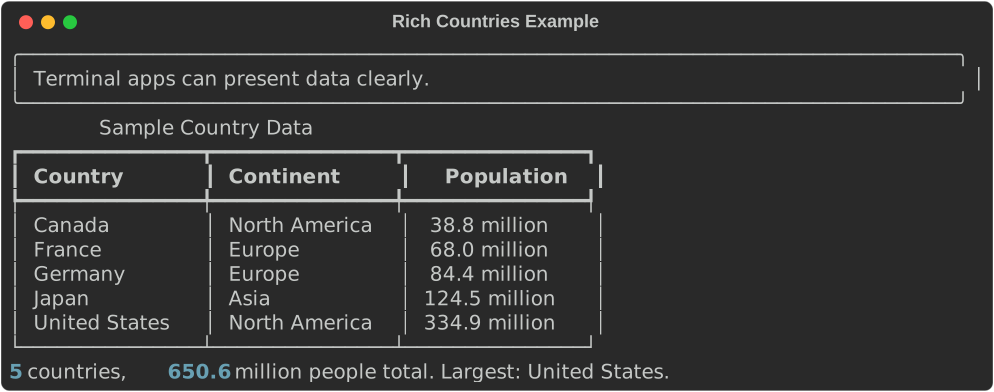
A Rich terminal display with a panel, table, and summary.#
The exact appearance depends on your terminal, but the program structure is
simple: data, table-building function, summary function, and main.
A Small Textual App#
textual is a framework for building full terminal apps. It uses classes
because the app needs to remember state and respond to events. The example
below keeps the class small: one counter, two buttons, and one display.
class CounterApp(App):
    """A small Textual app with one piece of state."""

    def compose(self) -> ComposeResult:
        yield Static("0", id="count")
        yield Button("Add one", id="add")
        yield Button("Reset", id="reset")

    def on_mount(self) -> None:
        self.count = 0

    def on_button_pressed(self, event: Button.Pressed) -> None:
        if event.button.id == "add":
            self.count += 1
        elif event.button.id == "reset":
            self.count = 0

        self.query_one("#count", Static).update(str(self.count))


if __name__ == "__main__":
    CounterApp().run()
Run it from the terminal:
python examples/introcs-python/ui/textual_counter.py
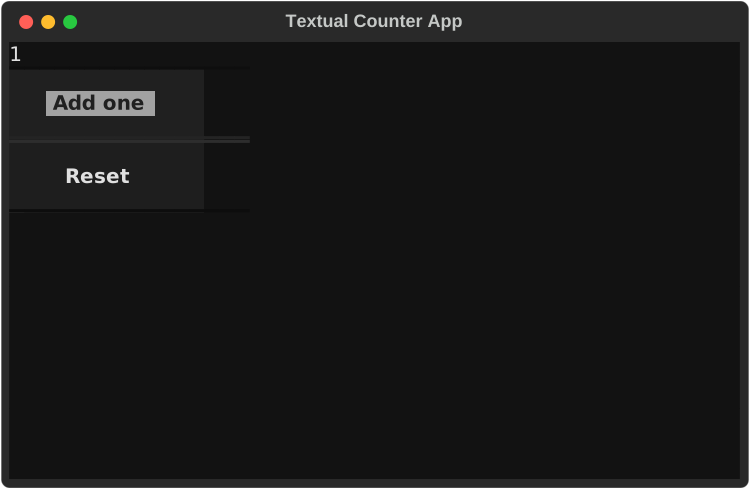
A small Textual app after the Add one button has been pressed.#
The important parts are:
composedescribes what appears on the screen.on_mountinitializes the app’s state.on_button_pressedresponds to button events.query_onefinds the display widget so the program can update it.
This is event-driven programming. The program does not call the event handler directly. The framework calls it when the user presses a button.
Keeping TUI Programs Understandable#
For introductory programs, keep the design modest:
Put ordinary data work in ordinary functions.
Use
richwhen formatted output is enough.Use
textualonly when the user needs interactive controls.Keep app classes small.
Avoid mixing data cleaning, analysis, and display code in the same function.
This approach lets you build useful terminal apps without turning every program into a large object-oriented design.
Where Other Interfaces Fit#
TUIs are one kind of user interface, not the only kind. If your program needs a
desktop window, a graphical toolkit may be a better fit. If your program needs
to run in a browser, a web app framework may be a better fit. For example,
streamlit is commonly used for Python data apps and dashboards, gradio
is common for AI model demos, and dash is often used for more formal
analytical dashboards.
The main idea is transferable: separate the core computation from the user interface. A function that filters a DataFrame or computes summary statistics can be called from a command-line program, a TUI, a web dashboard, or a test.
Exercises#
Modify
rich_countries.pyto add anAreacolumn to the table.Add a function that filters the country data by continent and displays only the matching rows.
Change the summary so it reports the average population.
Write a Rich program that reads a CSV file with
pandasand displays the first ten rows in a table.Modify
textual_counter.pyto add aSubtract onebutton.Build a small Textual app with an input field and a display area. When the user enters a name, show a greeting.